Slack Integration 💬
Slack Integration for Pizza Ordering: Detailed Documentation
Overview
This component provides a Slack application designed to integrate with the Kubernetes Pizza Observability project. The primary purpose of this Slack app is to provide a human-in-the-loop confirmation step for pizza orders triggered by cluster alerts. It enhances the system by allowing team members to review and approve or reject automated pizza orders via an interactive Slack message, preventing unwanted orders and adding a layer of control.
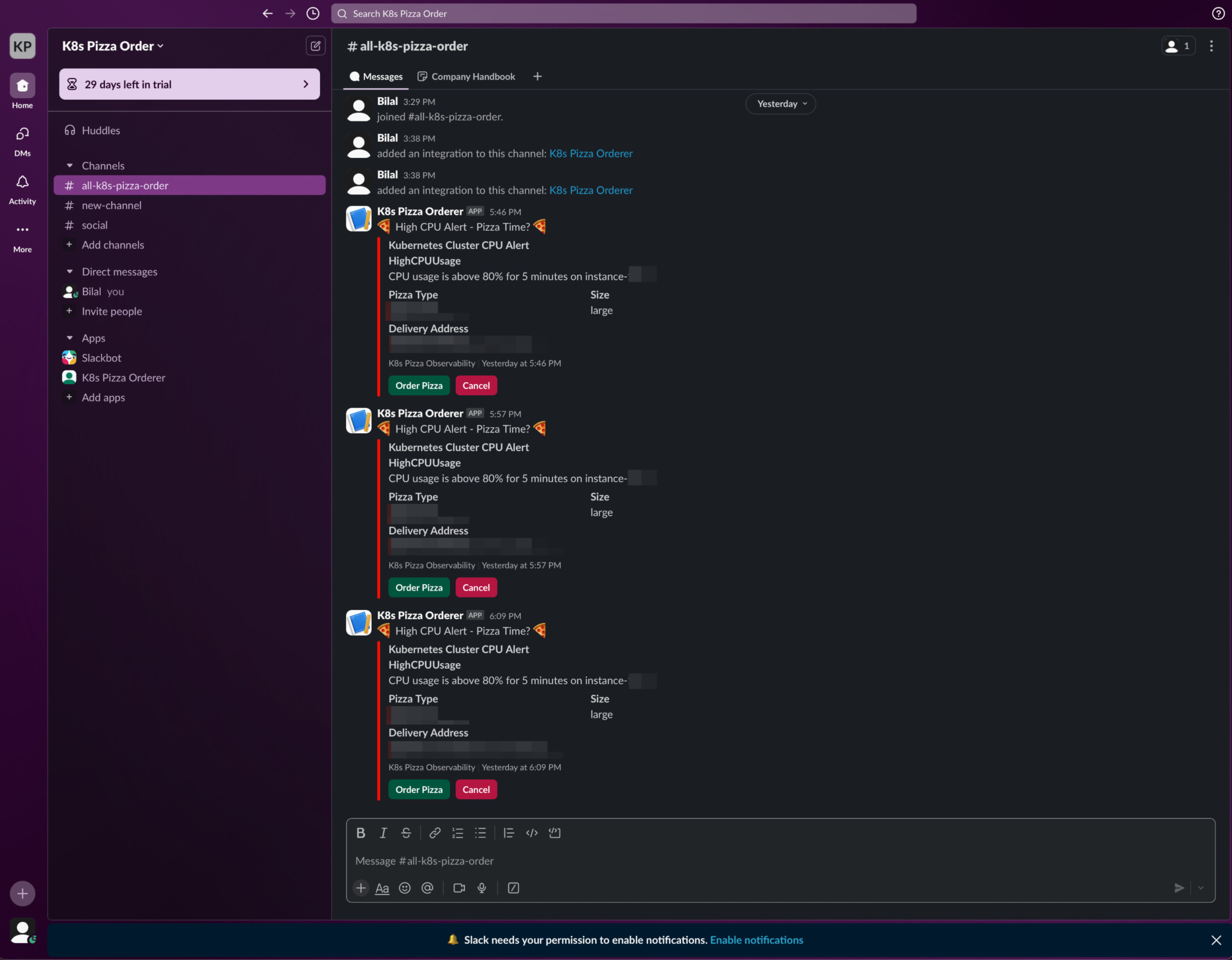
Example of a Slack confirmation message for a pizza order
Features
- Alert Notifications: Delivers real-time, actionable notifications to a designated Slack channel when a high CPU usage alert (or other configured alert) triggers a potential pizza order.
- Interactive Order Confirmation: Presents users with interactive buttons ("Approve Pizza Order" / "Reject Pizza Order") directly within Slack to decide the fate of an automated order.
- Order Status Updates (Future Enhancement): Could be extended to provide updates on the pizza order status (e.g., preparation, baking, out for delivery) back into Slack.
- Slash Commands (Optional): Supports custom slash commands for actions like manually checking cluster status or triggering a test pizza order (if implemented).
Architecture
The Slack app is a Node.js application built using the Bolt for JavaScript framework. Its key architectural components include:
- Bolt App (
app.jsorapp-http.js): The main application instance that initializes the Bolt framework, configures listeners for Slack events, actions, and commands. - Event Handlers: Functions that process incoming events from Slack, such as
app_mentionor messages in subscribed channels. - Action Handlers: Functions that respond to user interactions with interactive components, like button clicks from the order confirmation message.
- Command Handlers: Functions that execute logic when a user invokes a registered slash command.
- Message Payloads: JSON structures defining the content and layout of messages sent to Slack, including interactive elements (buttons, menus).
- API Integration: Logic to communicate with:
- Azure Function: To signal approval or rejection of a pizza order, which then instructs the Kubernetes Pizza Controller.
- Kubernetes API (Optional): For slash commands that might query cluster status or
PizzaOrderresources directly.
Setup and Configuration
Prerequisites
- A Slack Workspace where you have permissions to install and configure apps.
- Node.js (version 14.x or later recommended).
npmoryarnfor package management.- A publicly accessible URL for your Slack app to receive events from Slack. For local development,
ngrokis highly recommended. For production, this will be the URL of your deployed application (e.g., on a server, container platform, or serverless function).
Step 1: Create a Slack App
- Navigate to the Slack API Apps page.
- Click "Create New App".
- Choose "From scratch".
- Enter an App Name (e.g., "K8s Pizza Bot") and select your Development Slack Workspace.
- Click "Create App".
Step 2: Configure App Features & Permissions
Once the app is created, you'll need to configure its features from the app's settings page (sidebar navigation):
- OAuth & Permissions:
- Scroll down to "Scopes".
- Under "Bot Token Scopes", add the following essential scopes:
chat:write: Allows the app to send messages as itself.commands: Allows the app to register and respond to slash commands.- (Optional)
chat:write.public: To write to public channels it's not a member of. - (Optional)
users:read: If you need to look up user information.
- Slash Commands (If you plan to use them):
- Go to "Slash Commands" in the sidebar.
- Click "Create New Command".
- Fill in the details for each command:
- Command: e.g.,
/k8s-pizza-approve - Request URL:
https://YOUR_PUBLIC_APP_URL/slack/commands(replaceYOUR_PUBLIC_APP_URL) - Short Description: A brief explanation of the command.
- Click "Save".
- Command: e.g.,
- Interactive Components:
- Go to "Interactivity & Shortcuts" in the sidebar.
- Toggle "Interactivity" to On.
- Set the Request URL:
https://YOUR_PUBLIC_APP_URL/slack/actions(replaceYOUR_PUBLIC_APP_URL). This URL will receive payloads when users click buttons or interact with other components. - Click "Save Changes".
- Event Subscriptions (If your app needs to listen to events like mentions or messages):
- Go to "Event Subscriptions" in the sidebar.
- Toggle "Enable Events" to On.
- Set the Request URL:
https://YOUR_PUBLIC_APP_URL/slack/events(replaceYOUR_PUBLIC_APP_URL). Slack will verify this URL. - Under "Subscribe to bot events", add events your app needs to listen to (e.g.,
app_mentionif you want it to respond to mentions). - Click "Save Changes".
Step 3: Install App to Workspace
- Go to "Basic Information" in the sidebar.
- Scroll down to "Install your app" and click "Install to Workspace" (or "Reinstall app" if you've made permission changes).
- Review the permissions and click "Allow". This will generate your Bot User OAuth Token (
xoxb-...).
Step 4: Environment Configuration
Your Node.js application will require environment variables to connect to Slack and other services. Create a .env file in the slack/ directory (this file should be in your .gitignore to avoid committing secrets).
# Slack App Credentials
SLACK_BOT_TOKEN="xoxb-YOUR_SLACK_BOT_TOKEN" # Found under "OAuth & Permissions" after installing the app
SLACK_SIGNING_SECRET="YOUR_SLACK_SIGNING_SECRET" # Found under "Basic Information" -> App Credentials

# Port for the Slack app to run on
PORT=3000 # Or any other port you prefer

# URL of your Azure Function (or other alert handler)
# This is where the Slack app will send the approval/rejection signal
AZURE_FUNCTION_URL="https://YOUR_AZURE_FUNCTION_APP_NAME.azurewebsites.net/api/HttpPizzaOrderConfirmationHandler" # Example URL

# (Optional) Kubernetes API details if slash commands interact directly with the cluster
# KUBERNETES_API_URL="https://YOUR_K8S_API_SERVER_URL"
# KUBERNETES_TOKEN="YOUR_K8S_SERVICE_ACCOUNT_TOKEN"
Step 5: Application Code (app.js / app-http.js)
Ensure your app.js (or app-http.js if using HTTP mode for serverless environments) is configured to:
- Initialize the Bolt app with the
SLACK_BOT_TOKENandSLACK_SIGNING_SECRET. - Listen for incoming HTTP requests from Slack (for events, actions, commands) on the specified
PORT. - Handle interactive button clicks (e.g., "Approve", "Reject") by:
- Acknowledging the interaction.
- Sending an HTTP request to the
AZURE_FUNCTION_URLwith the decision. - Updating the original Slack message to reflect the action taken (e.g., "Order Approved by @user").
- (If applicable) Handle slash commands.
Step 6: Installation & Running the App
# Navigate to the slack directory
cd slack

# Install dependencies
npm install

# Start the application
npm start
Deployment
Using Docker (Example)
- Dockerfile: Ensure you have a
Dockerfilein theslack/directory similar to this:FROM node:16-alpine WORKDIR /usr/src/app COPY package*.json ./ RUN npm install COPY . . EXPOSE 3000 # Or your configured PORT CMD [ "node", "app.js" ] # Or app-http.js - Build and Run:
# Build the Docker image
docker build -t k8s-pizza-slack-app .

# Run the container (ensure .env file is available or pass env vars directly)
docker run -d -p 3000:3000 --env-file .env k8s-pizza-slack-app
Kubernetes Deployment (Example)
- Create a Kubernetes
DeploymentandServicemanifest for the Slack app. - Store
SLACK_BOT_TOKENandSLACK_SIGNING_SECRETas KubernetesSecretsand mount them as environment variables into the pod. - Ensure the
Serviceis exposed publicly (e.g., via an Ingress controller) so Slack can reach its endpoints. - Example
slack-app-deployment.yaml(simplified):apiVersion: apps/v1 kind: Deployment metadata: name: slack-app namespace: k8s-pizza spec: replicas: 1 selector: matchLabels: app: slack-app template: metadata: labels: app: slack-app spec: containers: - name: slack-app image: your-registry/k8s-pizza-slack-app:latest # Your Docker image ports: - containerPort: 3000 env: - name: SLACK_BOT_TOKEN valueFrom: secretKeyRef: name: slack-credentials key: botToken - name: SLACK_SIGNING_SECRET valueFrom: secretKeyRef: name: slack-credentials key: signingSecret - name: AZURE_FUNCTION_URL value: "YOUR_AZURE_FUNCTION_URL" - name: PORT value: "3000" --- apiVersion: v1 kind: Service metadata: name: slack-app-service namespace: k8s-pizza spec: selector: app: slack-app ports: - protocol: TCP port: 80 targetPort: 3000 type: ClusterIP # Use LoadBalancer or Ingress for external access
Usage Flow
- Alert Trigger: Prometheus detects high CPU usage, AlertManager fires an alert to the Azure Function.
- Azure Function Action: The Azure Function processes the alert and (instead of directly ordering) sends an interactive message to the configured Slack channel via the Slack app. This message includes details of the potential order and "Approve" / "Reject" buttons.
- User Interaction: A team member clicks "Approve" or "Reject" in Slack.
- Slack App Handling: The Slack app receives the button click payload.
- It acknowledges the click.
- It sends a signal (e.g., an HTTP POST request) to the Azure Function with the user's decision and relevant order details.
- It updates the original Slack message (e.g., "Order approved by @User. Processing...").
- Azure Function Finalizes: The Azure Function receives the decision:
- If approved, it proceeds to create the
PizzaOrderCR in Kubernetes, which the Pizza Controller then picks up to place the actual Dominos order. - If rejected, it logs the rejection and takes no further action regarding pizza ordering.
- If approved, it proceeds to create the
Troubleshooting
- App Not Receiving Events/Actions from Slack:
- Verify that your Request URLs in the Slack app configuration are correct and publicly accessible.
- If using
ngrok, ensure it's running and the URL in Slack settings matches thengrokforwarding URL. - Check your application logs for any errors on startup or when receiving requests.
- Ensure your server/firewall isn't blocking requests from Slack's IP ranges.
- Authentication/Authorization Errors (e.g.,
not_authed,invalid_auth):- Double-check that
SLACK_BOT_TOKENandSLACK_SIGNING_SECRETare correct in your environment configuration. - Ensure the necessary Bot Token Scopes are added in the Slack app settings.
- If you reinstalled the app, the bot token might have changed.
- Double-check that
- Slash Commands Not Working:
- Verify the Request URL for Slash Commands is correct.
- Ensure the
commandsscope is added.
- Interaction with Azure Function Failing:
- Check Slack app logs for errors when trying to send requests to
AZURE_FUNCTION_URL. - Ensure
AZURE_FUNCTION_URLis correct and the Azure Function is running and accessible. - Verify any authentication mechanisms between the Slack app and Azure Function.
- Check Slack app logs for errors when trying to send requests to
Viewing Logs
- Local Node.js App: Check the console output where you ran
npm start. - Docker Container:
docker logs <container_id_or_name> - Kubernetes Pod:
kubectl logs -n k8s-pizza <slack-app-pod-name>
Security Considerations
- Signing Secret Validation: Always validate incoming requests from Slack using the
SLACK_SIGNING_SECRETto ensure they are genuine. Bolt for JavaScript handles this automatically if configured correctly. - Token Security: Store
SLACK_BOT_TOKENand other secrets securely. Do not hardcode them. Use environment variables and, in production Kubernetes, use KubernetesSecrets. - Least Privilege: Only grant the Slack app the minimum necessary OAuth scopes.
- HTTPS: Ensure all communication (Request URLs, calls to Azure Function) uses HTTPS.
- Input Validation: Validate any data received from Slack interactions before processing or passing it to other services.
Contributing
Contributions to enhance the Slack integration are welcome. This could include:
- More sophisticated message formatting.
- Additional slash commands for cluster/order management.
- Direct integration for order status tracking from Dominos API back to Slack.
- Improved error handling and user feedback messages.